NDIS worker compliance software: screening, training, and roster readiness
How NDIS providers can keep worker screening, training evidence, expiring credentials, and roster eligibility checks reviewable before shifts are assigned.
Pre-shift
is when worker screening, training, and expiry gaps should surface

The useful software question is which role needs which evidence before it can be rostered.
Start with risk-assessed roles, not a generic staff list
The NDIS Quality and Safeguards Commission explains worker screening obligations for registered providers, including risk-assessed roles and provider responsibilities for checking workers. Source: NDIS Commission worker screening for registered providers.
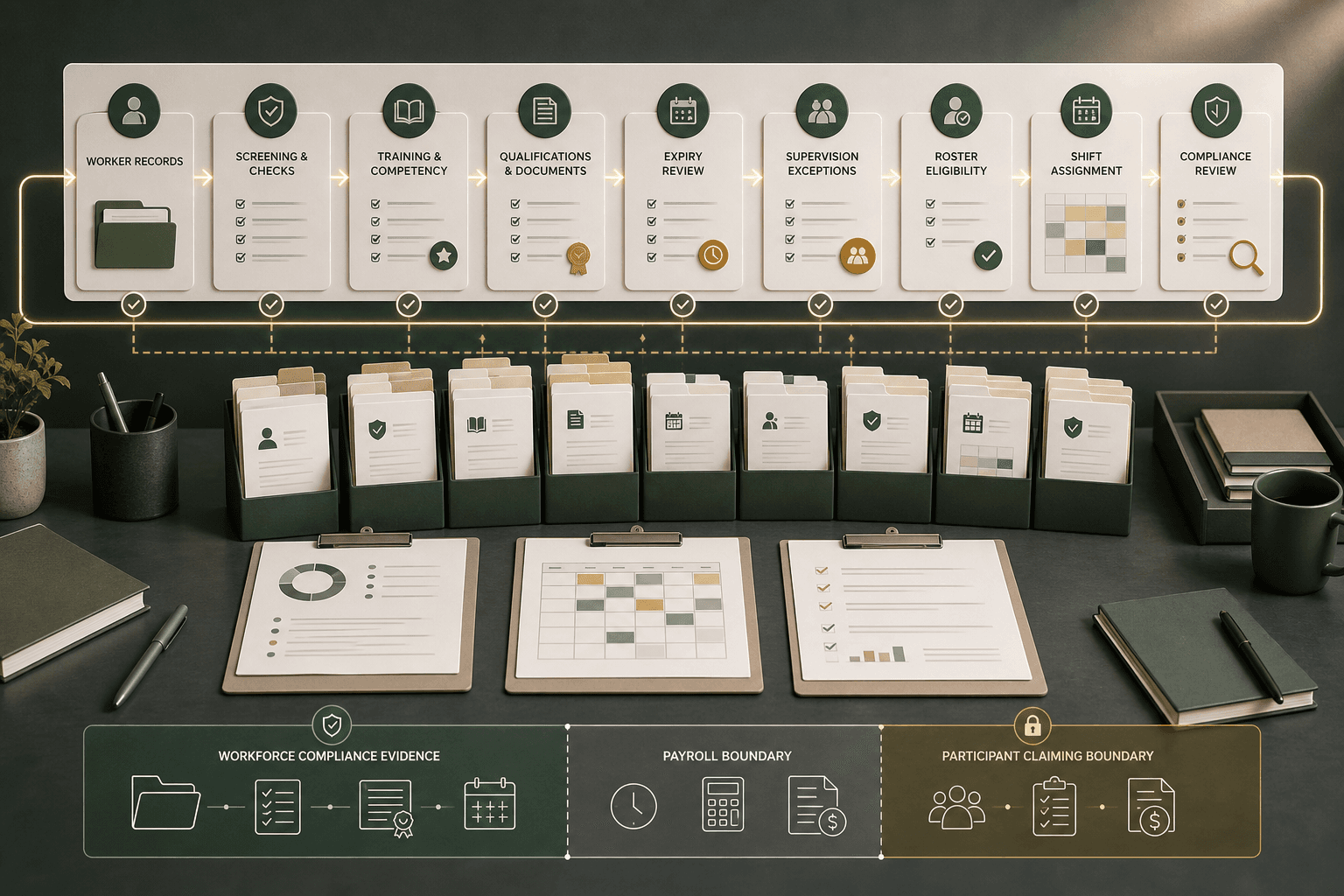
That matters for software selection because a generic staff record is not enough. Providers need to see the role, service context, worker screening status, expiry date, supervision exception, and roster eligibility signal before a shift is assigned.
Effica's NDIS compliance software path is the right product page for this topic because the compliance record should stay close to incidents, documents, audit evidence, and the roster decisions it affects.
A roster block should be explainable, not a mystery buried in a staff profile.
Keep worker screening records reviewable after portal changes
The official worker screening material makes the Commission, state and territory screening units, and providers part of the same screening ecosystem. A provider workflow should therefore retain the local review trail: who checked the status, which role it applied to, when the evidence expires or needs review, and what exception was approved.
The NDIS Code of Conduct also keeps the focus on safe and ethical support delivery. Software should not claim to make that judgement automatically; it should surface missing evidence, stale checks, and unresolved exceptions for a responsible manager to review.
For buyer evaluation, ask whether the product can show the reason a worker is eligible, conditionally eligible, or blocked for a specific roster context. A green tick without source evidence is weak audit support.
Rostering software
Connect worker eligibility signals to the roster and shift-allocation workflow.
Worker compliance evidence article
Read the companion compliance article on complaints, incidents, audit evidence, and follow-up.

Training records are operational controls only when they affect the work being assigned.
Tie orientation and training evidence to roster eligibility
The NDIS Commission publishes online training modules for the NDIS workforce, including orientation and practice-related modules. A provider still needs its own process for assigning, tracking, reviewing, and storing evidence that the right worker has completed the right learning for the work they perform.
The NDIS Practice Standards verification module shows why evidence needs to be reviewable in context. A credential field, training certificate, supervision note, and roster rule are more useful when they can be read together.
For operations teams and roster managers, this means worker compliance software should answer a simple question before assignment: is this worker ready for this role, this participant context, this branch, and this shift type?
A worker can be roster-ready, payroll-ready, and claim-ready for different reasons.
Separate compliance readiness from payroll and participant claiming
Fair Work's record-keeping guidance explains employer obligations for employee records and pay slips. Source: Fair Work record-keeping and pay slips.
That is adjacent to, but not the same as, NDIS worker compliance evidence. The roster team needs eligibility and supervision context; payroll needs time, classification, allowances, and approvals; claiming needs delivered support evidence and agreement context.
Effica separates those workflow boundaries while keeping them close enough for review: workforce evidence informs roster assignment, the roster informs timesheets, and delivered supports inform billing. The official rules remain the source of truth; Effica helps teams keep the operational trail readable.
Rostering payroll readiness article
Trace roster approvals, timesheets, payroll review, and NDIS claim readiness as separate checks.
Billing software
Review the downstream finance workflow for claims, payment results, and reconciliation.
The strongest buying questions are evidence questions, not feature-list questions.
What to ask before buying NDIS staff compliance software
Ask how the system handles expiring clearances, expiring qualifications, missing orientation, supervision exceptions, branch or site rules, and workers who should be visible for one service type but blocked for another.
Ask whether every roster block or warning has a reason a manager can review. If the answer is only a vague status chip, the team may still need spreadsheets to explain the decision later.
Ask how evidence is protected. Effica's security page is relevant because workforce compliance records can include sensitive employment, credential, and service-delivery context even when they are not participant records.
The goal is not automatic compliance. The goal is fewer blind roster decisions.
How Effica keeps workforce checks close to rostering and audit review
Effica helps providers bring worker evidence, roster context, operational notes, and audit review into one practical flow. It does not replace NDIS Commission guidance, Fair Work obligations, legal advice, or a provider's own governance decisions.
The product pattern is deliberately review-first: surface the worker's readiness signal, show the reason, keep the source evidence nearby, and make the manager decision visible before the roster goes live.
If your current process depends on spreadsheet expiry dates, folder screenshots, and manual roster checks, start with a workflow review rather than a feature checklist. The highest-risk gaps usually sit between systems.
Effica supports the workflow around worker evidence, roster readiness, and audit review. The official NDIS Commission and Fair Work sources remain the rules source of truth.
Continue with Effica
See how worker evidence, compliance tasks, and roster-readiness checks can stay reviewable before shifts are assigned.
Review Effica's compliance workflowRelated Effica pages
NDIS compliance software
Review the product workflow for compliance evidence, tasks, and audit trails.
View pageNDIS rostering software
Connect eligibility checks and worker context to roster planning.
View pageNDIS provider software
See the wider operating system for provider teams moving beyond disconnected tools.
View pageSupport worker mobile app
Keep shift evidence, notes, and handover context close to workers in the field.
View pageContinue reading
More from the Effica blog
NDIS CRM software buyer guide
NDIS CRM software: choosing a system for participant relationships
A practical buyer guide to participant records, consent, agreements and service handoffs in an NDIS provider CRM.
Read articleMy provider relationships
NDIS my provider relationships: software checks for onboarding and claims
A practical workflow for keeping participant communication, my provider relationship requests, service agreements, role dates and claim review connected.
Read articleReferral intake and onboarding
NDIS referral management software: intake to service start
A practical workflow for moving an NDIS referral through consent, suitability, support planning, agreements and a reviewable service-start handoff.
Read article