Support-worker travel and kilometre evidence: mobile capture to payroll and NDIS billing review
How NDIS providers can capture travel between clients, kilometres, vehicle evidence, timesheet context, payroll review, and provider-travel billing boundaries in one mobile workflow.
2
separate reviews fed by the same evidence: worker payroll and NDIS provider-travel billing
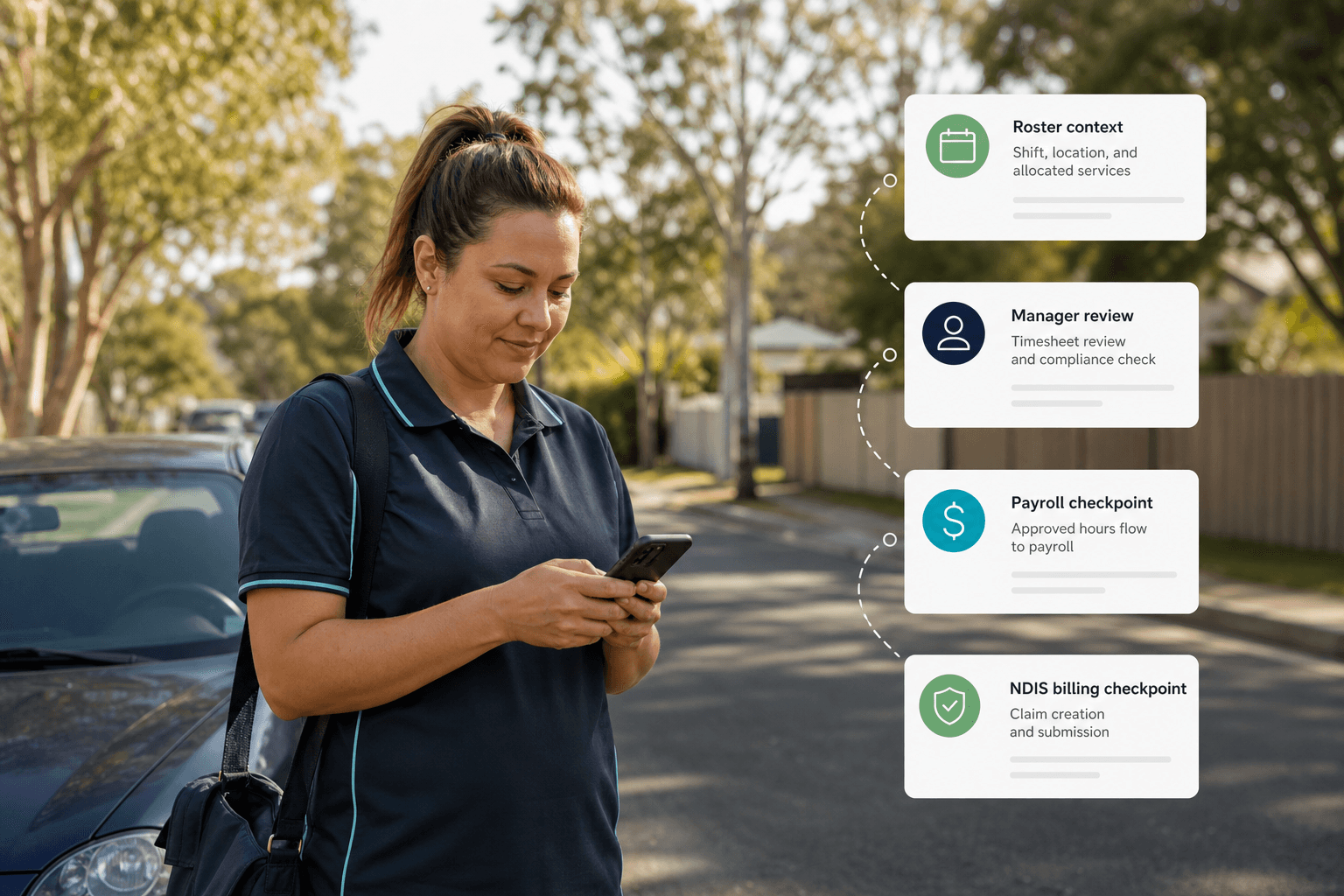
A kilometre total without the roster and duty context leaves too much for the office to reconstruct.
Capture travel while the shift context is still fresh
Fair Work's current SCHADS pay and allowances guidance says travel between clients may be paid work time and does not break a shift. It also says a vehicle allowance can apply when an employee is required and authorised to use their own vehicle for work. Source: Fair Work pay and allowances in the SCHADS Award.
For a mobile workflow, that means capturing more than start and end kilometres. The record should keep the related shifts, travel start and finish context, origin and destination purpose, authorised vehicle use, kilometres, receipt evidence where relevant, worker note, and submission time together for review.
Effica's support-worker mobile app path supports this buyer question because travel evidence should flow from the field into roster, timesheet, manager, payroll, and finance review without becoming a separate spreadsheet.
These facts can share one capture flow without being treated as the same entitlement or claim.
Separate travel time, vehicle evidence, and participant transport
Fair Work distinguishes travel between work locations while on active duty from ordinary travel to and from work. Its guidance also explains that own-vehicle allowance depends on the worker being required and authorised to use that vehicle. Source: Fair Work vehicle and travel entitlements.
The software should therefore let a reviewer distinguish travel between clients, participant transport during support, an authorised personal-vehicle record, parking or toll evidence, and an unpaid break or commute. A single generic travel field hides those boundaries.
The aim is not for an app to make an award interpretation. It is to keep enough source facts and approval history visible for the provider's authorised payroll and finance reviewers to make the decision against current official guidance.
SCHADS broken shifts and travel
Review travel time, broken-shift spans, and payroll-export checks from the rostering side.
NDIS rostering software
Connect mobile travel evidence to the roster, timesheet, and approval trail.
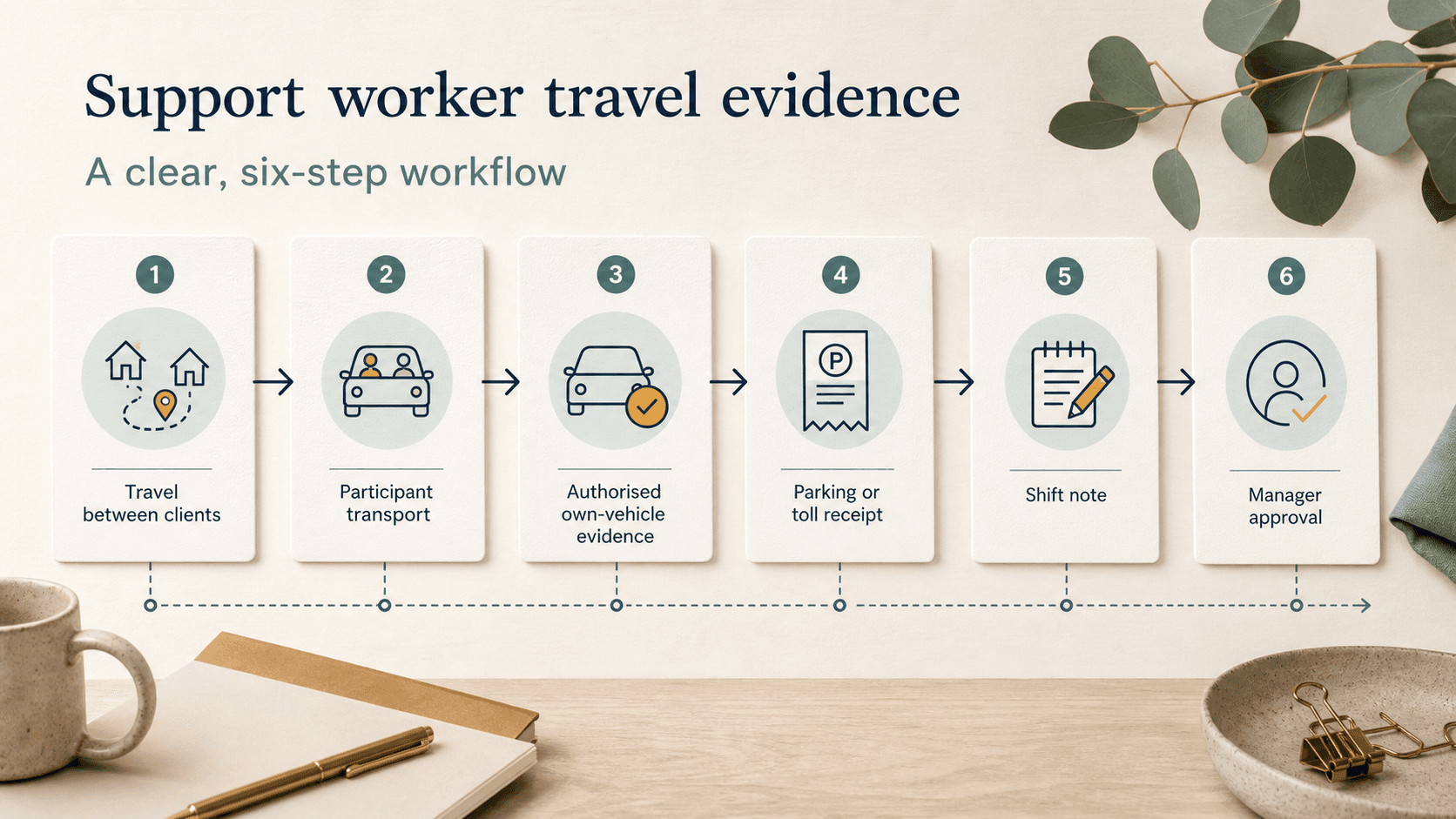
One journey can create two review questions, but one approval should not silently answer both.
Keep SCHADS payroll review separate from NDIS provider-travel billing
The current NDIS pricing schedule includes Provider travel - non-labour costs support items. The official pricing-arrangements page remains the source for the current schedule and supporting rules. Sources: NDIS Pricing Schedule 2026-27 and NDIS pricing arrangements.
Payroll review asks whether the worker's time, vehicle use, allowance context, award configuration, and timesheet export are ready. NDIS billing review asks whether the delivered support, participant agreement, support item, provider-travel conditions, evidence, and claim pathway are ready. Those reviews can use the same field record while retaining different owners and outcomes.
Effica is a workflow support tool, not the source of SCHADS or NDIS rules. Providers should check the current official documents, their service agreements, and appropriate payroll or claiming advice before money moves.
NDIS billing software
Review claim preparation, payment outcomes, exceptions, and reconciliation context.
Payroll export and SCHADS checks
Continue into pay-run readiness and downstream payroll mapping.
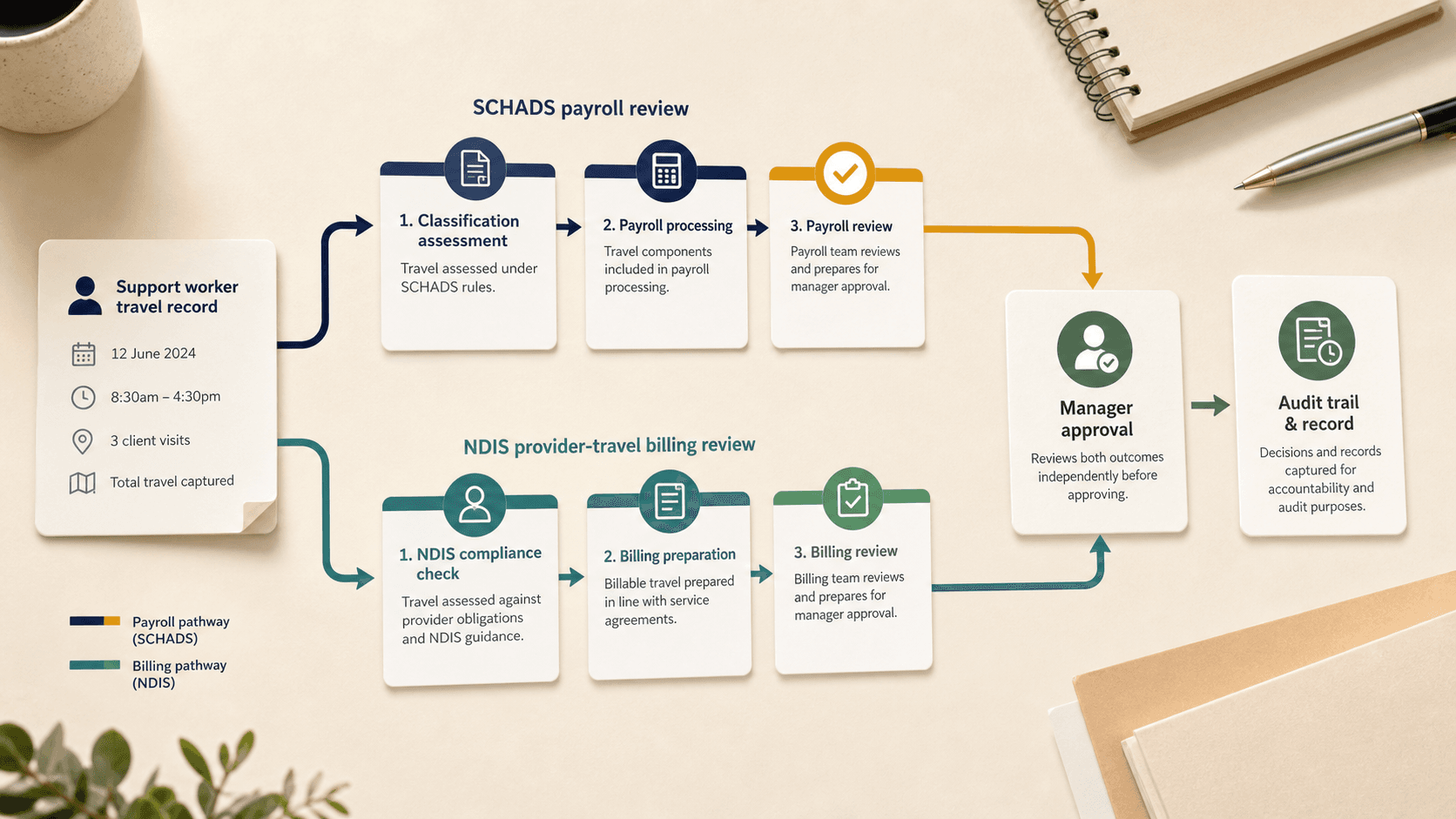
Approval should preserve the reason, evidence, reviewer, and downstream outcome.
Make manager approval explain the exported timesheet
Fair Work says employers need accurate and complete time and wage records and must issue pay slips. Source: Fair Work record-keeping guidance. A travel record should therefore remain connected to the approved timesheet and any correction rather than disappearing after export.
A useful approval queue shows missing journey context, duplicate or overlapping segments, absent vehicle authorisation, unresolved receipts, changes after worker submission, and the payroll or billing lane still waiting. The reviewer should be able to return the record with a reason instead of editing the worker's evidence invisibly.
After export or claiming, the audit trail should retain the source record, approved values, reviewer, decision time, downstream reference, and correction history. That makes reconciliation and later questions explainable without exposing unnecessary location detail to every user.
Choose for review quality and workflow fit, not only GPS capture.
What to ask before choosing a kilometre-tracking app
Ask whether workers can classify the journey purpose, link it to the right shifts, record authorised vehicle use, add receipt evidence, correct a draft, and understand what location data is captured. Ask whether managers can see conflicts, return records, approve payroll and billing separately, and trace changes after export.
Also check offline behaviour, mobile permissions, branch and participant access, retention, audit history, and how the provider handles a worker who cannot or does not grant location access. A kilometre workflow should degrade to reviewable manual evidence rather than silently blocking shift completion.
Effica is being built to connect mobile evidence with roster, timesheet, payroll, billing, and audit review. The practical next step is to walk through one real travel scenario from worker capture to manager decision and finance reconciliation.
A useful support-worker travel workflow preserves journey purpose, authorised vehicle evidence, kilometres, shift context, manager approval, payroll outcome, NDIS billing decision, and correction history without pretending those decisions are the same.
Continue with Effica
If travel evidence still moves through texts, paper receipts, roster notes, and payroll spreadsheets, book a personalised Effica workflow review.
Review Effica's support-worker mobile workflowRelated Effica pages
Support-worker mobile app
Review the primary product workflow supported by this article.
View pageNDIS rostering software
Connect travel evidence to roster, timesheet, and approval context.
View pageNDIS billing software
Keep provider-travel review close to claim and reconciliation workflows.
View pageSCHADS broken shifts and travel
Read the related roster and payroll exception guide.
View pageEffica security
Review public information about sensitive operational records and controls.
View pageEffica support
Discuss implementation and workflow review with the Effica team.
View pageContinue reading
More from the Effica blog
NDIS CRM software buyer guide
NDIS CRM software: choosing a system for participant relationships
A practical buyer guide to participant records, consent, agreements and service handoffs in an NDIS provider CRM.
Read articleMy provider relationships
NDIS my provider relationships: software checks for onboarding and claims
A practical workflow for keeping participant communication, my provider relationship requests, service agreements, role dates and claim review connected.
Read articleReferral intake and onboarding
NDIS referral management software: intake to service start
A practical workflow for moving an NDIS referral through consent, suitability, support planning, agreements and a reviewable service-start handoff.
Read article