SCHADS broken shifts and travel: NDIS rostering checks before payroll export
How NDIS providers can keep broken-shift spans, travel between clients, minimum payment checks, allowances, timesheet approval, and claim-readiness boundaries reviewable before payroll export.
3
review lanes to keep separate: roster facts, worker payroll evidence, and NDIS claim readiness

The roster should explain the exception before payroll has to repair it.
Why broken shifts belong in roster review, not only payroll
Fair Work's SCHADS broken-shifts guidance says a broken shift can span a maximum of 12 hours, sets conditions around unpaid breaks, and explains that employees need a 10-hour break before the next shift or broken shift. Source: Fair Work broken-shifts guidance.
For software buyers, that turns broken shifts into a roster-quality problem first. The system should show the first work period, break pattern, second or third work period, worker agreement context where relevant, approval status, and exception owner before the pay run.
Effica's NDIS rostering software path is the primary product page because the decision starts where shifts, timesheets, mobile notes, approvals, and payroll-export readiness meet.
Travel evidence is easiest to review while the shift context is still fresh.
Capture travel between clients before timesheet approval
Fair Work's SCHADS pay and allowances guidance says vehicle allowance can apply when an authorised employee uses their own vehicle for work, including travel between work locations while on active duty. It also explains that travel between clients may be paid time and does not break a shift. Source: Fair Work pay and allowances in SCHADS.
The buyer question is whether the roster and mobile workflow can keep the travel segment visible: origin and destination context, duty status, worker vehicle evidence, kilometres if recorded, participant support context, and the manager decision that made the timesheet exportable.
That evidence should also stay close to the support-worker mobile app workflow so late notes, field evidence, and handover context do not become a separate spreadsheet correction.
Support worker mobile evidence
See how clock-in, notes, evidence, and handover context support office review.
Short-notice cancellation review
Compare travel and broken-shift review with cancellation evidence and billing decisions.
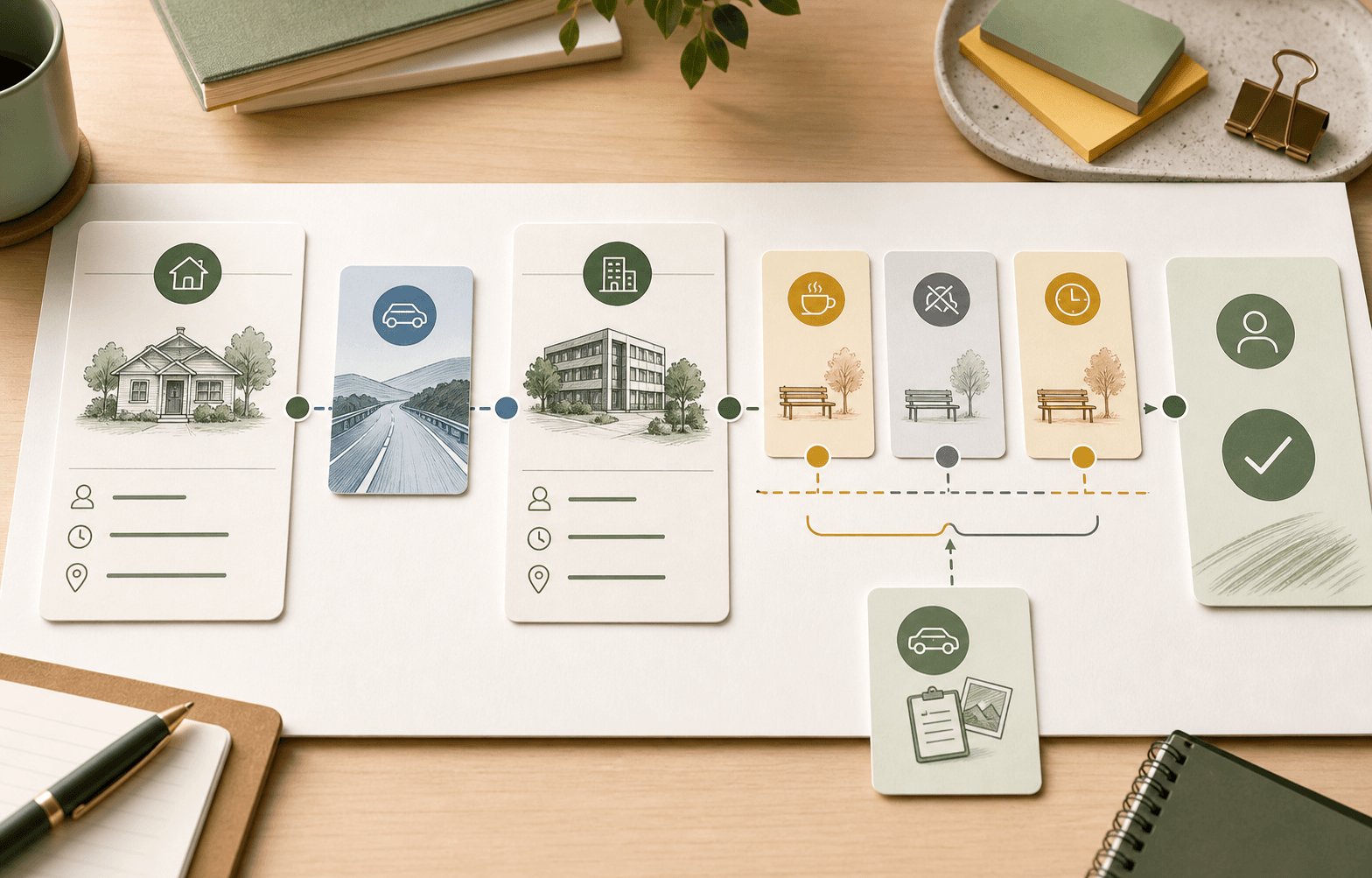
Do not reduce a complex shift pattern to one green payroll tick.
Keep minimum payment, allowance, and overtime checks visible
Fair Work's SCHADS hours guidance says broken-shift allowance depends on whether the employee works a broken shift with one or two unpaid periods, and points providers to the current SCHADS pay guide for allowance amounts. Source: Fair Work hours of work in SCHADS.
The SCHADS Award itself remains the legal source. It sets the detailed broken-shift clause, allowance clause, span rule, shift-allowance treatment, and break-between-shifts requirement. Source: SCHADS Award MA000100.
Effica should support the review workflow rather than claim to interpret the award for the provider. Good software keeps the roster facts, timesheet facts, configured pay category, exception reason, reviewer, and export boundary visible for the right payroll reviewer.
The same roster evidence feeds different reviews, but the reviews are not the same.
Separate worker payroll evidence from NDIS claim readiness
The NDIS support catalogue explains which supports providers can use when requesting payment, maximum-price context, and claim-type information including travel. Source: NDIS support catalogue.
The NDIS guide to getting paid says payment claims need details such as participant, support dates, support item reference number, and support item price. Source: NDIS guide to getting paid.
That is why the payroll lane and the claiming lane should stay linked but distinct. Payroll review asks whether the worker record, time, travel, allowance, overtime, and export mapping are ready. NDIS claim readiness asks whether delivered support evidence, support item context, funding route, approval state, and claim-type context are ready.
NDIS billing software
Review how claim preparation, payment outcomes, and reconciliation context stay connected.
Billing and Xero reconciliation article
See how approved support evidence moves into claims, payment outcomes, and reconciliation.

Ask for explainable exceptions, not only a payroll export button.
What to ask before buying SCHADS-aware rostering software
Before choosing software, ask whether broken-shift warnings explain the source facts: work periods, unpaid breaks, span, minimum-payment period, rest-between-shifts risk, travel segment, worker agreement context, public-holiday or overtime context, reviewer, and export outcome.
Also ask how the system handles corrections. A payroll-ready queue should show whether an exception is unresolved, approved, corrected, exported, rejected by the downstream payroll process, or held for manager review. Without that state, the team may still need spreadsheets to explain what happened.
NDIS provider portal guidance says bulk payment requests can be submitted through the provider portal and that providers should use the official self-help guide for submissions and rejection troubleshooting. Source: NDIS provider portal guidance. That claiming workflow is adjacent to payroll, not a substitute for payroll review.
The goal is reviewable operations, not invented payroll certainty.
How Effica keeps exception review close to the roster
Effica is being built to keep roster exceptions, mobile evidence, timesheet approval, payroll export readiness, and claim-readiness context in the same operating trail. That helps managers review the right facts before money moves.
It should not replace Fair Work, the SCHADS Award, NDIS pricing documents, payroll advice, accounting advice, legal advice, or provider judgement. The official sources remain the rules source. Effica supports the workflow around those checks.
For teams still stitching this together with roster exports, payroll spreadsheets, separate kilometre notes, and month-end claim review, the practical next step is a workflow walkthrough that follows one exception from roster to payroll and finance.
SCHADS-aware rostering software should make exceptions explainable before payroll export: broken-shift span, unpaid breaks, travel evidence, minimum-payment context, allowance review, timesheet approval, claim-readiness boundary, and reconciliation trail.
Continue with Effica
If your team is still reviewing broken shifts, travel evidence, payroll export, and NDIS claim readiness across spreadsheets, book a personalised Effica walkthrough.
Review Effica's rostering workflowRelated Effica pages
NDIS rostering software
Review the roster, timesheet, approval, and export workflow this article supports.
View pageNDIS billing software
Connect roster evidence to claim preparation, payment outcomes, and reconciliation.
View pageNDIS provider software
See how rostering, workforce, compliance, finance, and provider operations fit together.
View pagePayroll export to Xero Payroll AU
Continue into pay-run readiness, worker mapping, and payroll export boundaries.
View pageSCHADS sleepover changes
Compare broken-shift review with sleepover and active-overnight roster evidence.
View pageEffica support
Talk to Effica about implementation, workflow review, and provider support.
View pageContinue reading
More from the Effica blog
NDIS CRM software buyer guide
NDIS CRM software: choosing a system for participant relationships
A practical buyer guide to participant records, consent, agreements and service handoffs in an NDIS provider CRM.
Read articleMy provider relationships
NDIS my provider relationships: software checks for onboarding and claims
A practical workflow for keeping participant communication, my provider relationship requests, service agreements, role dates and claim review connected.
Read articleReferral intake and onboarding
NDIS referral management software: intake to service start
A practical workflow for moving an NDIS referral through consent, suitability, support planning, agreements and a reviewable service-start handoff.
Read article